Save time managing product categories
Managing each product category manually can become slow as the catalog grows.
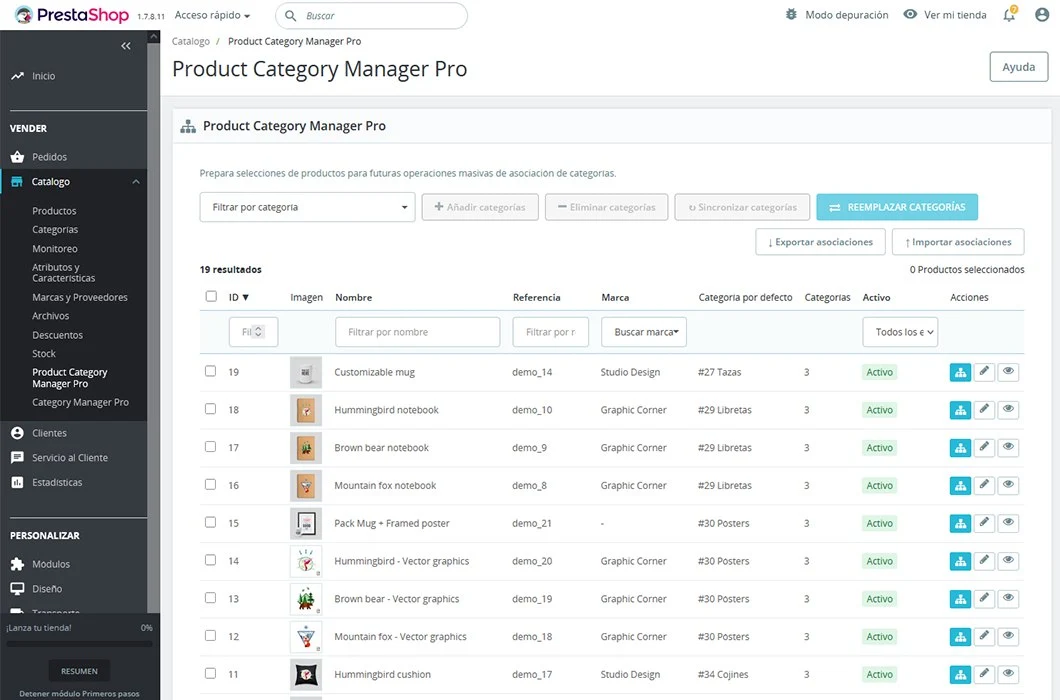
Product Category Manager Pro centralizes these tasks on one screen so you can select products and update their categories with bulk operations.
Assign, remove, replace and synchronize categories
When creating a collection, campaign or special section, you can add many products to one or several categories in one operation.
- Select several products.
- Choose one or more categories.
- Add new associations while keeping existing ones.
- Remove category associations in bulk.
- Replace old categories with new ones.
- Synchronize categories from a reference product.
These functions are useful during catalog reorganizations, campaigns, seasonal changes or migration processes.
Manage the default category
Each product needs a default category used as the main reference inside PrestaShop.
- Assign a common default category.
- Choose a category from existing associations.
- Define what happens when the default category is removed.
- Assign the Home category when no other category remains.
- Avoid changes that leave an inconsistent configuration.
Find the products you need to modify quickly
The interface includes search, filtering, sorting and pagination tools for large catalogs.
You can search by ID, name or reference, and filter by category, brand or status.
From the list you can review assigned categories, check the default category, open the product page in the Back Office or view the product in the store.
Import and export associations with CSV
CSV import lets you update large numbers of products more efficiently.
- Add data from suppliers.
- Migrate associations from another store.
- Apply planned reorganizations from a spreadsheet.
- Update large catalogs.
- Recover previously exported configurations.
Export can be used to review the current organization, create a backup, prepare changes or transfer associations to another installation.
Work more efficiently with large and multistore catalogs
The module is designed for stores where manual category management is no longer practical.
- Catalogs with hundreds or thousands of products.
- Products that belong to several categories.
- Frequent changes to the catalog structure.
- Campaigns or temporary collections.
- Supplier updates.
- Multistore configurations.
In multistore you can select the store you want to manage and work inside its context.
Keep catalog organization consistent
Associations between products and categories directly affect store navigation.
Product Category Manager Pro makes it easier to review and update these relationships from one interface, helping avoid misplaced products, outdated categories, duplicates and inconsistent default categories.
Main features
- Centralized product and category management.
- Bulk assignment, removal, replacement and synchronization.
- Default category updates.
- Individual association editing.
- Search by ID, name or reference.
- Filters by category, brand and status.
- Sorting and pagination.
- CSV import and export.
- Batch processing for large files.
- Multistore compatibility.
Who is Product Category Manager Pro for?
Stores with large catalogs
Manage categories for many products without opening each product page individually.
Merchants that reorganize the catalog often
Add, remove or replace categories when collections, campaigns or seasons change.
PrestaShop agencies and developers
Speed up migrations, reorganizations and maintenance tasks in client stores.
Stores that work with suppliers
Import associations from CSV files and adapt large volumes of products with less manual work.
Compatibility
Product Category Manager Pro is compatible with PrestaShop 1.6.0.4 and later, PrestaShop 1.7, PrestaShop 8, PrestaShop 9, multistore configurations and multilingual catalogs.
Check the module page on PrestaShop Addons for exact compatible versions and the latest information.
Frequently asked questions
Can I assign a category to several products at once?
Yes. You can select several products, choose one or more categories and add them in one operation.
Are existing categories removed?
Not when using the add categories function. New associations are added without removing existing ones.
Can I remove categories from several products?
Yes. You can select products and remove one or more categories in bulk.
Can I replace one category with another?
Yes. You can replace old categories with new ones across several products at the same time.
Can it import and export associations?
Yes. You can import and export product-category relationships with CSV files.
Is it multistore compatible?
Yes. You can select a store and manage category associations inside its context.