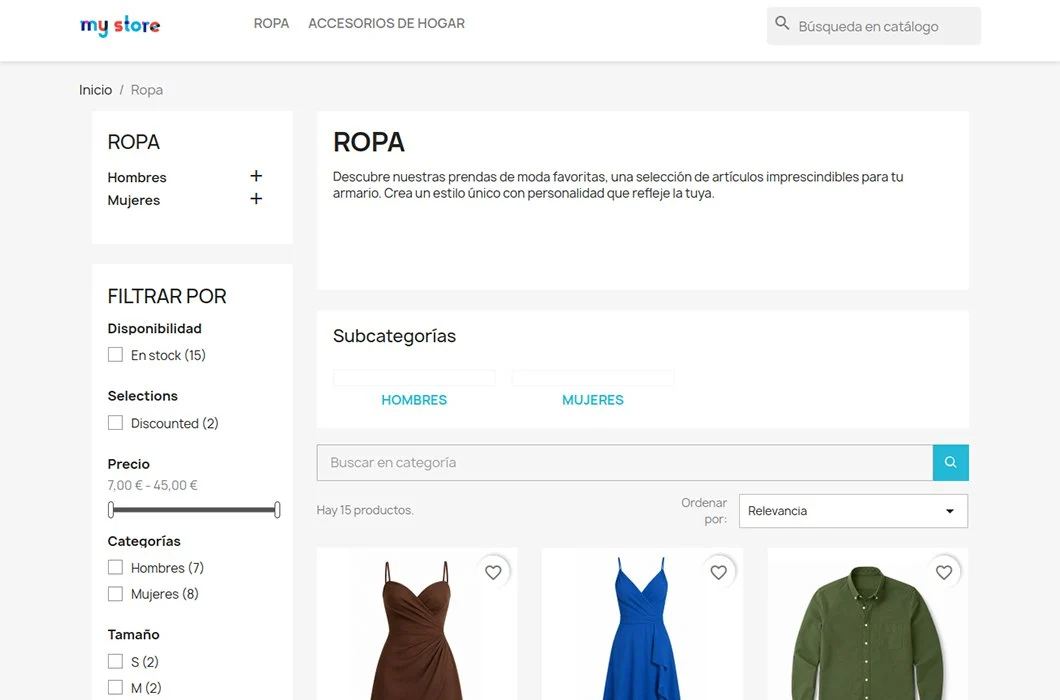
Help your customers find what they need faster
Imagine a customer enters a category with hundreds of products, applies several filters and then wants to find a specific brand, model or reference.
Without a search field inside the category, they would need to browse several pages or use the store-wide search. Doing that can make them lose the selected filters and leave the context they were browsing.
With Category Search Filter, they only need to type a keyword to search among products in the current category.
This lets them keep browsing from the same point and find the product they need sooner.
Search only inside the current category
The module focuses the search on products from the category the customer is visiting.
For example, if someone is browsing the “Running shoes” category, they can search for a brand, model, feature or reference without receiving results from other store sections.
This makes search more precise and helps visitors keep their context throughout the buying process.
Keep filters and sorting
Category Search Filter is designed to complement the navigation tools your store already uses.
Customers can combine keyword search with:
- Faceted filters.
- Attribute or feature filters.
- Sorting by price, name or other criteria.
- Product pagination.
- Navigation options available in the category.
If the visitor has already filtered results or chosen a sorting option, they do not need to start again.
The search is added to the current navigation so they can keep refining results naturally.
More comfortable navigation in large categories
Categories with many products can be difficult to browse, especially when there are similar items, several brands or many references.
Category Search Filter helps customers:
- Find specific products faster.
- Avoid browsing page after page.
- Search without leaving the category.
- Keep already applied filters.
- Combine keywords with faceted navigation.
- Reduce frustration during search.
- Make product discovery easier.
Customers get a more direct way to reach the product they need without making store navigation more complex.
Search by name, reference, description or manufacturer
Not every customer searches in the same way.
Some remember the product name. Others know a reference, a brand or a feature included in the description.
Category Search Filter can find matches in different product fields:
- Name.
- Reference.
- Short description.
- Description.
- Manufacturer or brand.
This lets each customer use the information they know to find the right product.
A simple solution for a specific need
Category Search Filter is not meant to replace the general PrestaShop search or compete with advanced search platforms.
Its goal is much more specific: allow customers to search products inside the current category without losing filters or navigation context.
By focusing on this function, the module offers a simple experience for both merchants and customers.
It does not add complex systems or change the usual way of browsing the store. It simply adds a useful tool where visitors need it.
Main features
Keyword search inside the category
Customers can search only among products associated with the category they are visiting.
Compatible with store filters
The keyword can be combined with faceted filters to narrow results even further.
Keeps selected sorting
Users can keep sorting by price, name or other criteria while searching.
Search in several product fields
The module can find matches in the name, reference, descriptions and manufacturer.
Configurable position
You can choose where to display the search form inside the category page.
Responsive design
The interface adapts to desktops, tablets and mobile phones.
Multistore compatible
It can be used in PrestaShop multistore installations.
Compatible with PrestaShop 1.7.8 and 9.x
The module works from PrestaShop 1.7.8 up to current PrestaShop 9 versions.
What kind of stores is it useful for?
Category Search Filter can be especially useful if your store has:
- Categories with many products.
- Items with similar names or models.
- Products from different brands inside the same category.
- Customers who often search by reference.
- Technical or specialized catalogs.
- Faceted navigation.
- A catalog that grows constantly.
It can also help in smaller categories when you want to offer a quick and direct way to find specific products.
A simple example
A customer enters a category with 300 products.
First they filter by brand, size and price range. Then they want to find a specific model.
With Category Search Filter they can type the product name or reference and see only results that:
- Belong to the current category.
- Match the searched keyword.
- Meet the selected filters.
- Keep the chosen sorting.
They do not need to leave the category or apply the filters again.
Benefits for your store
Adding a search field inside categories can make the catalog more comfortable to explore.
With Category Search Filter you can:
- Improve navigation in large categories.
- Help customers find specific products.
- Use the filters already available in the store.
- Offer a more contextual search.
- Reduce unnecessary navigation steps.
- Add a useful feature without installing a complex search solution.
Configuration is simple and the behavior is easy for any visitor to understand.
Frequently asked questions
Does it replace the general PrestaShop search?
No.
The general search shows results from different parts of the catalog. Category Search Filter is used to search only inside the category the customer is visiting.
Both tools can be used together.
Are filters lost when searching?
No.
The module keeps selected filters and sorting so customers can keep searching from the same context.
Does it work with faceted navigation?
Yes.
Keyword search can be combined with filters available on the category page.
Which product fields does it search?
It can search matches in the name, reference, short description, description and manufacturer or brand.
Is it only useful for stores with very large catalogs?
No, although its value is most visible in large categories.
It can also help in small catalogs with many similar products, technical references or several brands.
Is it an advanced search module?
It is not an advanced search platform or a complex navigation system.
It is a specialized solution to search products inside the current category in a simple and lightweight way.
Is it multistore compatible?
Yes.
Category Search Filter can be used in PrestaShop multistore installations.