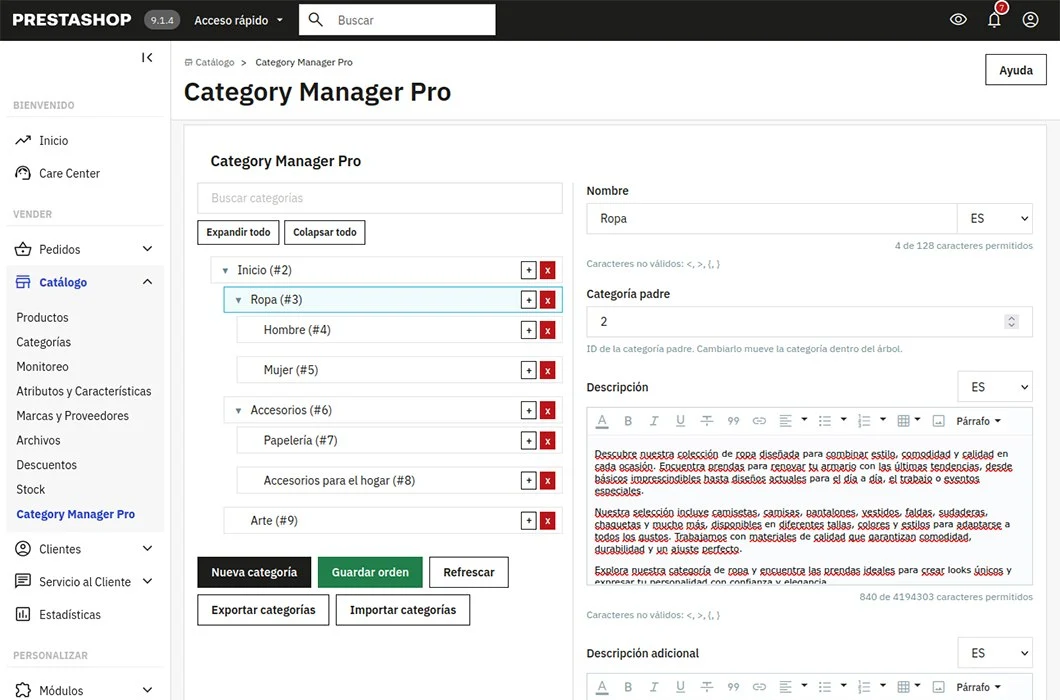
Organize the category tree visually
The category structure is a fundamental part of any online store.
As the catalog grows, keeping that structure organized can become slow. Changing a category position, reorganizing several sections or creating new subcategories often requires moving through many Back Office pages.
Category Manager Pro brings category management together on one screen.
From its visual tree you can quickly review the catalog organization and apply changes more directly.
Move categories with drag and drop
Reorganize the category tree by dragging each item to its new position.
You can change category order or move categories inside another category without manually editing their parent category.
This is useful when reorganizing a large part of the catalog, preparing a new navigation structure or adapting categories to a campaign or season.
Changes are made from a clear interface that helps you understand the resulting structure at all times.
Create and edit categories from one interface
Category Manager Pro lets you create categories and subcategories directly from the tree.
You can also edit existing category information without leaving the module interface.
Manage data such as:
- Category name.
- Description.
- Meta title.
- Meta description.
- Friendly URL.
- Category status.
- Image.
- Parent category.
- Position in the tree.
All information is organized to make catalog maintenance easier and reduce the number of steps needed for each update.
Save time in catalogs with many categories
Editing categories one by one from the standard system may be enough for small stores.
However, when the catalog contains dozens or hundreds of categories, even simple changes can take a long time.
Category Manager Pro is especially useful for stores that:
- Work with broad category structures.
- Add or reorganize categories frequently.
- Manage catalogs in several languages.
- Need to import or export information.
- Use the PrestaShop multistore feature.
- Need a global view of the catalog structure.
By centralizing operations, the module reduces repetitive work and helps avoid errors caused by editing each category separately.
Find categories quickly
When the category tree is very large, finding a specific category can be difficult.
The integrated search lets you find categories by name without manually browsing the whole structure.
This makes it easier to access deep categories and speeds up editing, review and reorganization tasks.
Manage categories in several languages
Category Manager Pro is compatible with multilingual stores.
You can edit the content for each language from the same interface, keeping category names, descriptions and SEO data organized.
This simplifies international catalog updates and avoids switching constantly between screens to complete translations.
Compatible with PrestaShop multistore
If you use multistore, you can work with the category structure for each store.
The module lets you select the store you want to manage and apply changes in that context.
This helps maintain different category structures per store and prevents unintended changes in other shops in the group.
Import categories from CSV files
CSV import lets you create or update large numbers of categories faster.
You can prepare the information in a spreadsheet and import it into your store later.
This is especially useful to:
- Create an initial category structure.
- Migrate categories from another store.
- Apply bulk updates.
- Add catalogs supplied by providers.
- Restore a previously exported category structure.
The import process includes options to adapt behavior to each catalog need.
Export the category structure
Category Manager Pro can also export store categories to a CSV file.
The export can be used as a backup, as a base for changes or to transfer the structure to another installation.
You can review and edit exported data comfortably with Excel, LibreOffice Calc or Google Sheets.
Keep a clear and consistent category structure
A well-organized structure helps customers find products more easily and helps search engines understand the store organization.
Category Manager Pro does not replace a web architecture or SEO strategy, but it makes that strategy easier to apply and maintain.
With a complete view of the category tree, it is easier to detect:
- Misplaced categories.
- Structures that are too deep.
- Duplicate categories.
- Sections that need reorganization.
- Names or metadata that need updates.
This helps keep the catalog more organized for both administrators and store visitors.
Main features
- Visual category tree.
- Drag-and-drop reorganization.
- Category and subcategory creation.
- Category editing from the module interface.
- Category deletion.
- Quick search by name.
- Multilingual management.
- Multistore compatibility.
- CSV category import.
- CSV category export.
- Category image management.
- SEO information updates.
- Integrated PrestaShop Back Office interface.
- Compatible with large catalogs and multi-level structures.
Who is Category Manager Pro for?
The module can be especially useful for:
Stores with large catalogs
View and manage a complete structure without navigating through many Back Office pages.
PrestaShop agencies and developers
Speed up category creation, migration and reorganization during development or maintenance of client stores.
Merchants that update the catalog frequently
Prepare new collections, campaigns or seasonal changes by reorganizing categories faster.
Multilingual or multistore shops
Manage content and structures for different languages and stores from a centralized interface.
Migration projects
Import and export categories with CSV to make catalog transfer or reconstruction easier.
A simpler way to manage PrestaShop categories
Category Manager Pro brings the main category management tasks together in a visual interface.
Instead of opening each category individually, you can review the full tree, make changes and maintain the catalog structure from one place.
Fewer steps, a clearer view and more control over your store organization.
Compatibility
Category Manager Pro is compatible with:
- PrestaShop 1.6.
- PrestaShop 1.7.
- PrestaShop 8.
- PrestaShop 9.
- Multilingual stores.
- Multistore configurations.
Check the module page on PrestaShop Addons for exact compatible versions and the latest information.
Frequently asked questions
Can I move categories without editing them one by one?
Yes. You can drag categories inside the tree to change their position or assign them to a new parent category.
Does it allow subcategory creation?
Yes. You can create new categories and subcategories directly from the module interface.
Can I edit category SEO information?
Yes. The module lets you manage fields such as meta title, meta description and friendly URL.
Does it work with several languages?
Yes. You can manage category information in the languages available in the store.
Is it multistore compatible?
Yes. You can select the store context you want to manage and work with its category structure.
Can I import categories?
Yes. Category Manager Pro lets you import information with CSV files.
Can I export existing categories?
Yes. You can export category structure and data to CSV for review, editing or backup.
Does the module automatically modify my store structure?
No. Changes are applied only when you perform an action from the interface and confirm the operation.